

HTML5 SOP MIQ
HTML5 Files for MIQ Using Tumult Hype
Create your ad in Hype.
- DO NOT USE SPACES in your hype file name, or any file names in your supporting file assets.
- Once approved, view your resources, and clean out any old images so you only have the images used for this ad. This will help keep the file size small (Final .Zip file can’t be larger than 150KB).
- Current (as of 3/6/2026) seven (7) sizes needed for MIQ: 120×600, 160×600, 300×50, 300×250, 300×600, 320×50, and 728×90.
Insert Header Code
- In right hand Column under the “Document” palate, click “Edit Head HTML”
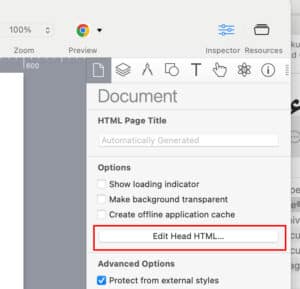
- Add the following code between the two header prompts, replacing the url placeholder with your desired target URL. This code defines the clickTAG variable and calles the parameter function needed to fire off the clicktag in Locality’s system. Here is an image of what it should look like, followed by a code block of the actual code.

Clicktag code for the Header:
	<script type="text/javascript">
var clickTag = "https://patrioticfestival.com/performers.html?utm_source=programmatic&utm_medium=cpc&utm_campaign=patrioticfestival";
</script>
- Don’t forget to replace your destination URL with UTM code in the clickTag variable definition statement. The code above uses the Patriotic Festival URL as a sample.
Export HTML5
- Export HTML5 using Doubleclick Studio.
- Open the folder download.
- Rename the html file in the root of the folder “index.html.”
- Remove the PIE.htc file from the subfolder. It gives issues.
Add <a> link code to Body
- Using Dreamweaver (or any other html editor), open the index.html file.
- Find the DIV within the Body of the file, and wrap the div in the link for the Clicktag within the link. Here is an image of what it should look like, followed by a code block of the actual code. You’re only putting in the “<a>” statements, putting the opening before the div, and the closing after the div.

Code wrapping a link in the DIV for the Body:
<a href="javascript:window.open(window.clickTag);void(0);">
	<div div details here>
	</div>
	  </a>
Package specifically for MIQ
HTML5 File Quality Assurance:
Before sending these files, please ensure that:
- All file names contain NO SPACES.
- Run each size through the Google Asset Validator at https://h5validator.appspot.com/dcm/asset
- MiQ wants two files per size:
- File 1: STATIC “FALLBACK” IMAGE: A Static image (JPG OR PNG) as back up (whatever still image you can extract from your animation that is a good representation of the ad-make sure this image is the exact size)
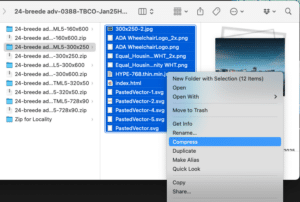
- File 2: A packaged HTML5 folder ZIP file: Within the extracted folder, select all images, html file, js files, etc, right click and compress all files into one archive zip. Rename this archive zip with the project name and ad size (ex. 25-SPAR-0288-Meeting-160×600.zip). This zip file is what you want to include as a folder within the zip file you submit to MiQ
- Package fallback images separately from the 7 html5 zip files. The resulting zip file will be your submission to MiQ for that ad size.